Wednesday, 13 May 2015

How to Check if Your Tecno Phone and Battery are Original

This will show you how to check if your Tecno Phone and battery are original or fake, since Tecno phones are becoming very popular the need to be sure you have the original phone and battery is very necessary as imitations of the Tecno batteries are now becoming available in the market, i am yet to know of the fake Tecno phones but i am sure they are also available in the market which was the sole reason why Tecno Mobile has decided to help in identifying the genuineness of their products                                               How to Check the Genuineness of your Tecno Phone
1. Get your IMEI and VC number from your phone (its at the back of the phone when you remove the battery or on the phone pack)
2. Visit http://gc.tecno-mobile.com/
3. Type in the IMEI and VC of your Tecno phone
4. Click submit to now check if your tecno phone is genuine or fake
5. Now you will see the result of the check if your Tecno Phone is original or fake
How to Check the Genuineness of your Tecno Battery
1. Remove your battery and copy out the serial number (SN)
2. Visit http://gc.tecno-mobile.com/
3. Type in your Serial Number/SN of your Tecno battery
4. Click submit
5. Now you will see if your Tecno battery if original or fake
Hint: if you are going to buy a Tecno phone, go with an internet enabled phone so you can check the phones genuineness before buying it, IMEI are also on the pack so you dont have to open it before checking.

FREE CARD FROM MTN

just dial *555*0000 plus another eight numbers and then # or *555*00001 plus another seven numbers and then #. start enjoying and accumulate some cards but you need to load real card before you are eligible

HOW TO GET MTN 2015MB DATA ON YOUR HOT INFINIX PHONE AND ANY ANDROID USER

HOT INFIX PHONES
For all hot infinix users, open your sms bomber application and type as follows;
1. Name or number: 131
2. Type sms: mifi
3. # of text: 5
After inserting all this into the each command you will press send and wait for response. check data bundle by sending this command *123*4*3*2#. Download sms bomber application by CLICKING HERE.
OTHER ANDROID USERS
for other android users, you will need to root your phone and change the IMEI of your phones to that of hot infinix. you can use this IMEI number (358429061906870) and change the last four digit numbers to generate your own IMEI. you can check for the validity of the IMEI number by using the app IMEI analyser. CLICK HERE to download. follow the above steps used for hot infinix to get your 2015mb also.
                                           HOW TO ROOT YOUR PHONE
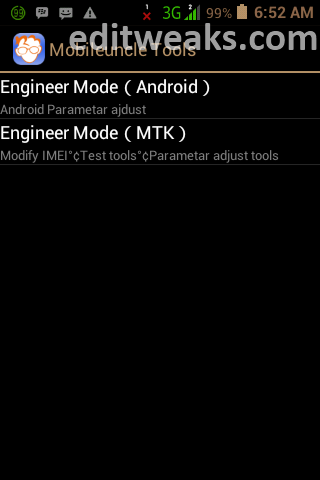
Repair or Changing the IMEI of your MTK / Android is now possible, this includes for MTK 6577 / 6575 android devices, e.g:- Tecno, Gionee, Infinix, and few others, and this post will show you how to do it using Mobile Uncle Tools.

NOTE:
1. This tweak was initiated for the main purpose of educating our readers, we will Not be held responsible if this info is used for any illegal activity.
2. We reserve the right that if you get your device bricked during the process stated below, We won't be held responsible for any Damages.

Meanwhile this post should be useful if your MTK phone is having problem registering your SIM to your network. Probably due to change of location.
That's by the way, but we assure damaging your device during procedure is nothing to worry about, you'll get it successfully done within seconds if you follow the Steps below carefully:

REQUIREMENTS For changing/Fixing the IMEI number on your MTK android :

1.  A Rooted Android (MTK 6577 / 6575)

2.  A valid IMEI number

3.  The  MobileUncle MTK Tools from PlayStore


N.B
Note that when you use IMEI number of your old unused mobile phone, be sure to never insert a SIM of same network again.
i.e >> If you use a Glo sim on a Blackberry (or any other phone), after you copied and use the Blackerry's IMEI into your Android, your Glo will work fine on your Android. But be sure not to insert that same Glo SIM into the Blackberry again, If you do and switch it on, the sim will not register to the network.

After getting the above ready, follow the Procedures below:

1. Dial *#06#, write down your Default IMEI, or Simply Back it up on ur SDcard >> See this Post on How to Backup IMEI on Android.

2. Run the MobileUncle tools App


3. Go to >> Engineer Mode >> Engineer Mode (MTK)


4. Scroll down to CDS Information

5. CLICK >> Radio Information

You'll see something like:
Phone1 -
Phone2 - 

In that select Phone2, because in most of these Chinese cloned phone, the 1st Sim which is a 3G will work perfectly. Problem only happens when we insert the second sim. Such cases are experienced if after you check, you can see the IMEI of 1st sim starting with 35xxxxx and the 2nd will start with 88xxxxxxxx. That is why the second sim is not able to register to the network, because its not in international formatted IMEI. So usually we need to change the IMEI of Phone 2.

When you select any of  Phone1 or Phone2 - you'll find AT+ __________
Inside there input your new IMEI number,
click >> SEND AT COMMAND
That's all!


EXTRA TIP UPDATED:

Some devices are different and may want to prove stubborn, so here's an extra tip just in case the steps above didn't work for you.
  • TO CHANGE IMEI FOR  SIM1 OR DEVICES WITH ONE-SIM ONLY:
Type the following command then Press Enter or click SEND AT COMMAND
echo ‘AT+EGMR=1,7, “IMEI_NUMBER” ‘ >/dev/
pttycmd1


  • TO CHANGE IMEI FOR SIM2 (DUAL SIM):
If your phone is dual-sim, type this
command:  echo ‘AT+EGMR=1,10,
“IMEI_NUMBER” ‘ >/dev/pttycmd1

Press ENTER or SEND AT COMMAND

UPDATE FOR THOSE USING INFINIX HOT X507

if you get errors saying "Sending Failed" or "module not supported for device errors"
When you get the AT+EGMR
Make sure you leave a Space between ‘AT+EGMR= (and) the IMEI Number
For example > ‘AT+EGMR=[space]"2345XXXXX"
Now Click SEND AT command, You'll get response "AT command is mSent"
Now restart your Infinix Hot. That's all.

Yes we are done… now you can restart the phone and check the IMEI. See if it worked by dialing *#06#

Wednesday, 6 May 2015

ALL NIGERIA INTERNET BUNDLE PLAN

This is a complete list of all internet data bundle
plans provided by all Nigerian Internet Service
providers with their prices and subscription/
activation codes inclusive. It comes in handy if
you do not know which network to choose from
and which Internet bundle plan you would love to
activate for your usage. This guides covers the
various major network providers in Nigeria namely;
MTN, Airtel, Glo and Etisalat.
Let’s start with MTN.
All Internet Data Bundle Plans for MTN Nigeria and
their Subscription Codes
Plan
Name Service
Rental Bundle
Size Validity
Period SMS
Code Target Device
MTN
Mobile
Daily
N100 10MB 24
hours
Text
104
to
131
Handset
MTN
Daily
Internet
N500 150MB 24
hours
Text
104
to
131
Handset/PC/
tablet
MTN
 250MB
Mobile
Browsing
N1300 250MB
24/7-
30
days
Text
109
to
131
Handset/PC/
tablet
MTN
500MB
Mobile
Browsing
N2,000 500MB
24/7-
30
days
Text
110
to
131
Handset/PC/
tablet
MTN
1GB
Mobile
Browsing N3,500 1GB
24/7-
30
days
Text
111
to
131 PC/tablet
MTN
Monthly
for
Mobile
N1000 100MB
24/7-
30
days
Text
106
to
131
Handset
MTN
Weekly
for
Mobile
N500 25MB 24/7-
7 days
Text
105
to
131
Handset
MTN
Monthly
Internet
N8000 5GB
24/7-
30
days
Text
101
to
131
PC/tablet
MTN
Weekend
Internet
N3000 3GB
9am
Fri –
9pm
Mon,
30
days
Text
108
to
131
Handset/PC/
tablet
MTN Day
Time
Internet
N6,000 3GB
9am –
9pm,
30
days
Text
107
to
131
Handset/PC/
tablet
MTN
Night
Internet
N2,500 3GB
9pm –
6am,
30
days
Text
102
to
131
PC/tablet
Below is also Other MTN Data Plans that are Time
Based (It is known as the MTN Hourly Plans).
Time
Limit Amount Activation Code Validity
Period
2 Hours N250 Text 2H to 131 2 Days
20 Hours N1500 Text 20H to 131 7 Days
100
Hours N5000 Text 100H to
131 30 Days
300
Hours N13000 Text 300H to
131 90 Days
To check your internet Data balance on any MTN
Internet Bundle Plan, simply Text 2 to 131. Now,
lets move over to the Airtel Network.
All Internet Data Bundle Plans for Airtel Nigeria and
their Subscription Codes
Plan Name Service
Rental
Bundle
Size
Validity
Period USSD Code Target
Device
Airtel Daily
Internet
Browsing
N100 10MB 24 hours *141*712*11# Handset
Airtel Day
Internet
Browsing
N500 150MB 24 hours *141*712*3# Handset /
PC /tablet
Airtel
Weekly
Internet
Browsing
N400 25MB 24/7- 7
days *141*712*9# Handset
Airtel
Weekend
Internet
Browsing
N3,000 3GB weekends *141*712*8# Handset /
PC /tablet
Airtel Lite
Internet
Bundle
N1,000 200MB 24/7- 30
days *141*712*4# Handset /
PC /tablet
Airtel Night
Internet
Browsing N2,500 3GB 30 dayS *141*712*7# PC/tablet
Airtel Plus
Internet
Browsing
N5,000 3GB 24/7- 30
days *141*712*1# Handset /
PC/tablet
Airtel Max
Internet
Browsing
N8000 5GB 24/7- 30
days *141*712*2# PC/tablet
Airtel
Premium
Internet
Bundle
N15,000 10GB 24/7- 30
days *141*712*5# PC/tablet
Airtel
Smartphone
Internet
Bundle
N3,000 1GB 24/7- 30
days *141*712*10# PC/tablet
Above are all the internet bundle plans offered by
the Airtel Nigeria Network, to check your Data
Bundle Plans on your Airtel SIM, simply
dial *141*712*0# . Now straight down to the Glo
Network.
All Internet Data Bundle Plans for Glo Nigeria and
their Activation Codes
Plan Name Service
Rental
Bundle
Size
Validity
Period
USSD
Code
SMS
Code Target Device
Instant Surf N100 10MB 24
hours *127*51#
Text
51
to
127
Handset
One Week N400 50MB 7 days *127*52#
Text
52
to
127
Handset/PC/
tablets
Always
Micro N1,000 200MB 30 days *127*53#
Text
53
to
127
Handset/PC/
tablets
Always
Macro N3000 1GB 30 days *127*54#
Text
54
to
127 PC/tablets
Always Min N5000 3GB 30 days Text
11
to
127
PC/tablets
Always Max N7500 6GB 30 days
Text
12
to
127
PC/tablets
Always Day N500 150MB 24
hours *127*10#
Text
10
to
127
Handset/PC/
tablets
Silver Plan N10,000 10GB 30 days *127*11# PC/tablets
Gold Plan N15,000 15GB 30 days *127*12# PC/tablets
Platinium N18,000 20GB 30 days *127*13# PC/tablets
Glo G100 N6,000
3GB
data
limit
100
hours
Text
20
to
127 PC/tablets
Glo G300 N15,000
4GB
data
limit
300
hours
Text
21
to
127
PC/tablets
Glo G Work N6,000 3GB
data
limit
8am –
9pm
Text
31
to
127
PC/tablets
Glo G
Leisure N5,000
3GB
data
limit
8pm –
9am +
all day
weekend
Text
30
to
127
PC/tablets
These are all the codes for your internet data plans
on the Glo network. To check you internet
information , text info to 127 .
All Internet Data Bundle Plans for Etisalat Nigeria
and their Activation Codes
Below is a table that contains the etisalat plans
and their subscription codes.
Plan Name Service
Rental
Bundle
Size
Validity
Period
USSD
Code Target Device
Etisalat Daily Internet
Bundle N100 10MB 24
hours *229*3*1# Handset
Etisalat Weekly
Internet Browsing
Bundle
N500 50MB 7 days *229*3*4# Handset
Etisalat 200MB
Internet Browsing
Bundle
N1,000 200MB 30
days *229*2*1#
Etisalat 500MB
Internet Browsing
Bundle
N2,000 500MB 30
days *229*2*2# Handset /
PC /tablet
Etisalat 1.5GB Internet
Browsing Bundle N4,000 1.5GB 30
days *229*2*4# Handset /
PC /tablet
Etisalat 3GB Internet
Browsing Bundle N6,500 3GB 30
days) *229*2*3# Handset /
PC /tablet
Etisalat 6GB Internet
Browsing Bundle N8,000 6GB 30
days *229*2*5# PC/tablet
Etisalat Night &
Weekends Browsing N4,000 30
days *229*3*3# Handset /
PC /tablet
To check your data balance on your Etisalat SIM,
dial*228# I hope you now can choose which
particular network you wish to subscribe to their
internet data bundle package. Feel free to add any
code you think can be useful using the comment
box below.

Monday, 4 May 2015

GET AIRTEL 500MB OR 200MB DATA

It another great opportunity to surf internet with airtel network freely by following this steps:
1. make sure you are on airtel optimizer,; call the network provider to know your plan by dialing 111. tell the agent to migrate you to the plan, that is optimizer.
2.Then dial *141*13*500# to get 500mb if that is not working then dial *141*13*200# to get 200mb.
3.check your data bundle by dialing *140*500#

5 Cheap, High Performing Android Phones: Prices & Specs

Picking out the Android phone you should use is no mean feat. It’s even more difficult right now, since a number of brand new flagship phones are just starting to hit the shelves.
There are several manufacturers that offer handsets that bring quality specs and yet are priced low enough you don’t need to take out a second mortgage. In this article, we take a look at some of the best low-cost Android phones on the market.
We’ve been through our extensive mobile phone reviews to find the best cheap phones at the moment, so if you’re looking to pick up a decent handset for not much cash which is unbelievably affordable, these are the best budget phones at the moment in descending order.

5. Infinix Hot

infinix-hot
The Infinix Hot is a brand new hot smart phone from the Infinix innovations, it is a very pocket friendly mobile device with its weight at about 100 grams. It comes with a 1GB RAM that gives you the confidence of your phone never running slow as it very fast even with the largest of games running on it such as the Asphalt 8 racing game. Have you always wanted bold and bright display on your mobile phone? Then you are in luck.
Device Specifications:
Powered by a 1.3Ghz processor and a 1GB RAM, the Infinix Hot does not stop or slow down. And a 2000mAh battery ensures that it keeps on going. Running on Android KitKat 4.4.2, you automatically have access to over 1,000,000 work and fun apps and games. There’s also 16GB internal memory, enough space to store your music, movies, photos, documents and games.
Price: N16,000

4. Innjoo One 3G

innjoo-one-3g
Innjoo is going for thin and fashionable in its newest smartphone, the One 3G HD. It’s an impressively smart, feature-packed phone with a metal unibody and slim profile.
Device Specifications:
  • Display: 5″ IPS screen (720*1280)
  • Operating System: Android 4.4 Kitkat
  • CPU: MTK Octa-Core 1.4GHz
  • RAM: 2GB
  • Storage: 16GB
  • Front camera: 5.0 Megapixel
  • Back camera 13.0 Megapixel Auto Focus
  • Battery: 2600mAh Polymer Battery
Price: N30,000

3. Tecno H7

Tecno-H7
The Tecno H7 is packed with a 5 inch screen, it comes with a QHD display and a resolution of 2560×1440 pixels in a 16:9 aspect ratio. It has four times as many pixels as the 720p HDTV video standard. The TFT technology was designed to improve image qualities such as addressability and contrast. These features coupled with the screen size, makes it an excellent choice for HD viewing.
Device Specifications:
  • Android OS 4.2 Jelly Bean
  • Dual Sim
  • 4GB Internal Storage, 1GB RAM
  • 5 Inch, TFT Capacitive Touchscreen
  • 3 GHz Quad-Core Processor
Price: N30,000

2. Huawei 3C Lite

huawei 3c lite
Android 4.4.2 KitKat runs the show, and Huawei left the OS almost untouched except for the launcher and app drawer, which is merged and shown through their Emotion UI 2.0 software.
Device Specifications:
  • 3GHz quad-core MediaTek MT6582 processor
  • 1GB RAM
  • 16GB storage + up to 32GB microSD
  • 5-inch IPS display (1280 x 720 pixel resolution, 294 ppi)
  • 8MP rear camera (LED flash, autofocus, f/2.0 wide aperture, 5P optical lens) + 2MP front camera
  • 3 x 142.2 x 9.4mm | 156g
  • supports Dual SIM (3G + 2G), WiFi b/g/n, Bluetooth 4.0
  • features AirSharing,
  • 2000 mAh battery
  • Android 4.4.2 + Huawei Emotion UI 2.0
  • Available in black and white
N30,000

1. Infinix Hot Note

infinix hot note
Infinix Hot Note X551 is an improvement of the Infinix Hot X507, bringing on-board a HD display, more processing power and twice the battery capacity.
Device Specifications:
  • PROCESSOR: Mediatek Octa-Core 1.4 GHz
  • GPU: Mali 450
  • MEMORY: 1GB
  • STORAGE: 16GB (Expandable up to 32 GB Using the microSD Card)
  • CAMERA: 8MP main camera; 2MP front facing camera
  • DISPLAY: 5-inch Full HD IPS display
  • BATTERY: 4000mAh (with Super-Fast Charging feature)
  • CONNECTIVITY: WiFi, GPS, Bluetooth 4.0 Colours: Anthracite Grey, Copper Brown, Champagne Gold, Mint Green
Price: N23,500
The Major Online stores in the country are not lagging behind when it comes to selling these products, some of the best deals are available on Kaymu and Konga to mention a few.

HOW TO UNLOCK LATEST USB MODEM E355S-1 AND OTHERS


  Extract the files to your desktop, click on DC crap then run the file. Disconnect to the internet and plug your USB modem with a different provider SIM.(for Huawei users, you dont need to swap any SIM). And insert your modem to the USB port.


Datacards,now choose that matches on your modem)
Choose what manufacturer that your modem is. (Huawei Datacards or ZTE.
 Click the magnifying glass, and it will search for plugged USB modems.


Once the modem is detected, go to unlock by your right upper side and Click the Unlocking menu, then choose "unlock".


Wait till the unlocker program says that, unlock is successfully done. Now your modem can accept other network
HOW DC-UNLOCKER LOOK LIKE


PLEASE DONATE TO HELP ALSO

CHECK THIS SITE FOR MORE GUIDE. CLICK HERE